
Component Handling, Featured, JEDEC Trays
How I Identify JEDEC Trays and Help Customers Find the Right Fit

Aug
When someone asks me to help find a JEDEC tray, my first question is usually simple: Do you already have a tray that works? If the answer is yes, the molded information on that tray can give us a valuable starting point. If the answer is no, we work from the device information and application requirements instead.
I have spent more than 20 years helping customers with JEDEC trays, first while working for a tray manufacturer and now at Malaster. During that time, I have learned that selecting a tray is rarely as simple as matching a package name or looking at one molded number. The complete identification, revision, device fit, temperature requirement, quantity, and how the trays will be handled can all matter.
This article explains the practical process I use to identify an existing JEDEC tray or help narrow the choices for a new application.
The quick answer

If you need help finding a JEDEC tray, send clear photographs of the complete tray, both end tabs, the top and bottom, and every molded marking. Include the device part number or drawing, required quantity, temperature requirement, and whether you need an empty cover tray for each stack. The more complete the information, the less likely we are to chase the wrong tray.
Start with the tray that already works
An existing tray is often the best reference available. It tells us much more than the general package type. A working sample gives us the tray outline, cavity arrangement, pocket geometry, stacking features, molded identification, and sometimes the material or temperature rating.
When a customer has an existing tray, I ask for photographs before asking them to ship a sample. Good photographs can often help me recognize the manufacturer, read the molded identifier, and determine what else we need to confirm.
- Photograph the complete tray. Take a straight overhead image of the top and another of the bottom.
- Photograph both end tabs. Molded information may be split between the two ends or appear on only one side.
- Capture every molded character. Use close, well-lit images taken square to the surface so shallow lettering remains legible.
- Include the device. If possible, show a correctly oriented device sitting in the cavity without hiding the areas where it contacts the tray.
- Keep a physical sample available. Photographs are an excellent starting point, but some applications require an actual tray and device for final fit review.
Photography tip: Dark trays can be difficult to photograph. Use bright, even lighting, avoid glare, and tap the molded lettering on your phone screen to focus. Please do not crop the image so tightly that the location of the marking is lost.
What molded JEDEC tray markings can tell us
Molded markings may include a tray identifier, manufacturer or material brand, cavity size, pocket arrangement, package reference, revision, date code, temperature rating, or other manufacturing information. The format is not universal. Different manufacturers use different identification systems, and not every tray displays every detail.
That is why I look at the markings as a group rather than relying on a single number. I also compare what is molded into the tray with the physical cavity and the device being packaged.
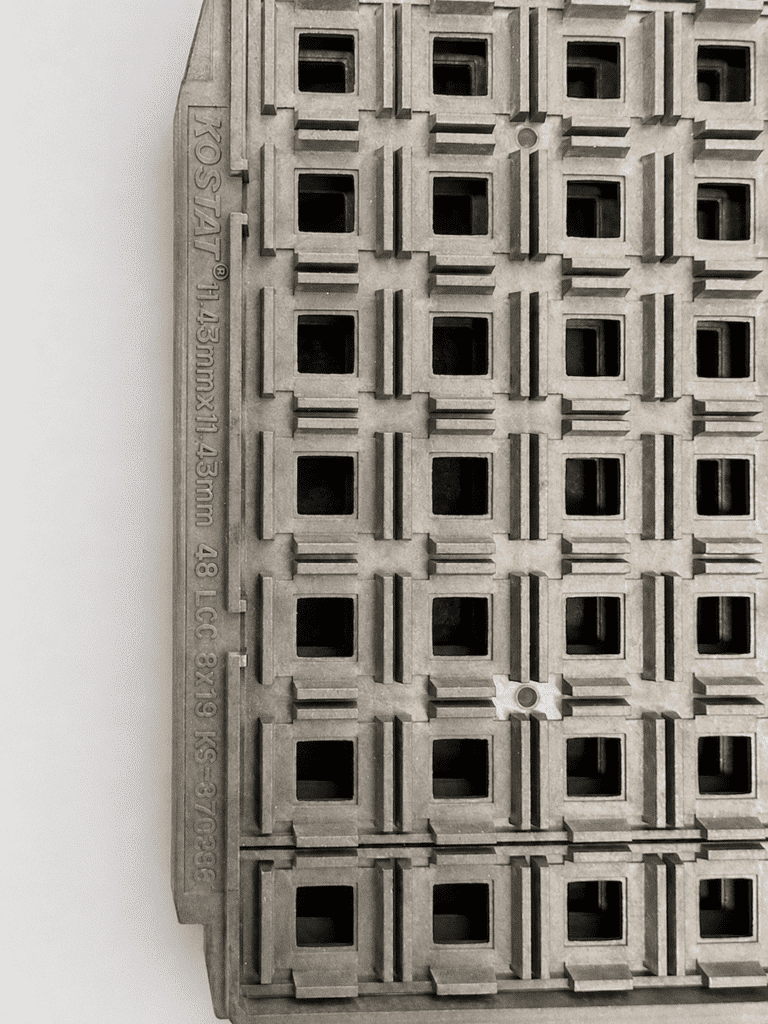
In the example above, the molded information gives us several useful clues, including a tray identifier and markings associated with the cavity dimensions and pocket configuration. Those clues help narrow the search, but they still need to be considered together with the tray revision and actual device fit.
Do not overlook the tray revision
One of the easiest details to miss is the revision. Two trays may carry the same main part number while showing different revision letters. A revision can reflect a change to a cavity, clearance, stacking feature, gate, marking, or another part of the design. Sometimes the change does not affect the customer’s device. Sometimes it does.
I never recommend assuming that trays are interchangeable merely because their primary molded number matches. The complete identifier, including its revision, should be recorded and compared.
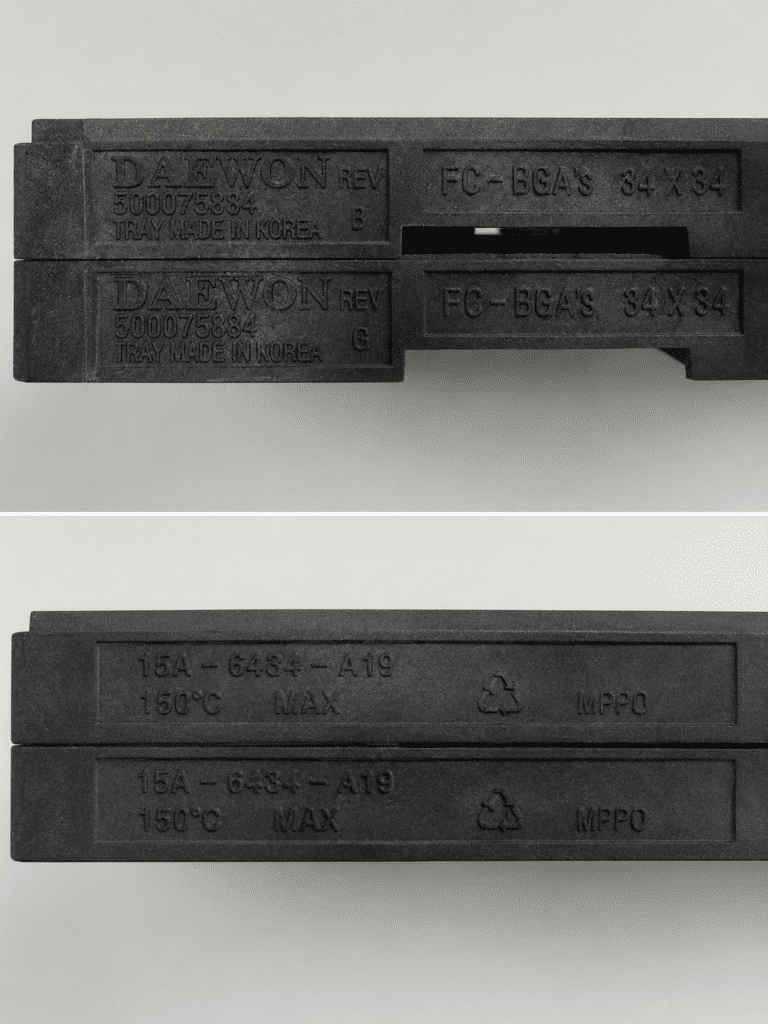
This comparison shows why a photograph of only the primary number is not enough. Both trays display the same main molded part number and temperature marking, but one is marked revision B and the other revision E. That difference deserves review before either tray is accepted as a replacement for the other.
The tray number is only part of the answer
Even when an existing tray has been identified, I still want to understand what device is going into it. JEDEC trays are designed to support and protect particular package geometries. A cavity that looks close in overall length and width may still contact leads, terminals, solder features, an exposed pad, or another sensitive area.
When reviewing fit, useful information includes:
- Device manufacturer and full device part number
- Package type and package drawing
- Overall body length, width, and height
- Lead, ball, pad, or terminal configuration
- Areas of the package that may and may not contact the tray
- Pin-one orientation or another required orientation feature
- Whether the device must remain stable during automated or manual handling
A device package drawing is very helpful, but a physical device sample can answer questions a drawing may not. For a critical fit, unusual package, or uncertain replacement, samples allow the cavity contact and movement to be evaluated directly.
What if there is no existing tray?
When there is no tray to identify, we begin with the device. I ask for the full device drawing, package designation, device manufacturer, application temperature, and quantity. From there, I can look for an existing tray design that appears appropriate or determine whether the application needs a new tray.
The package name alone is usually not enough. Two devices described with the same general package family can differ in body dimensions, lead geometry, terminal location, or height. Those details determine how the device should sit in the cavity and where the tray can safely make contact.
I also need to know how the trays will be used. A tray intended only for room-temperature storage has different requirements from one that will enter a bake process. Automated equipment may introduce orientation, pickup, flatness, or consistency requirements that are less important in a manual operation.
Confirm the real temperature requirement
A molded maximum-temperature marking is important, but it should not be treated as permission to use the tray in any process below that number without further review. The actual process temperature, exposure time, repeated cycles, loading, support conditions, and tray material can all affect performance.
Tell us whether the tray will be used for:
- Room-temperature storage or shipping
- Elevated-temperature handling
- Drying or baking
- Repeated temperature cycles
- A process with a specific time-and-temperature profile
If baking is required, include the target temperature and duration. Do not choose a tray based only on its color or appearance. Similar-looking trays can be made from different materials and can carry different temperature limits.
Order quantity includes more than the loaded trays

Quantity sounds straightforward, but there is one detail customers often forget: the cover tray. A typical stack uses an empty tray on top to protect the devices in the uppermost loaded tray. That empty cover needs to be included when calculating the total tray quantity.
For example, if an application uses ten loaded trays per stack and requires ten stacks, the packaging plan may require 100 loaded trays plus ten empty cover trays. The exact stacking method depends on the application, but it is better to account for the covers before the order is placed.
The stack may also need to be secured using an appropriate method, such as ESD hook-and-loop straps or ESD rubber bands. The securing method should hold the stack together without distorting the trays or interfering with the devices.
A matching identifier does not automatically settle the supply choice
Once the tray has been identified and the application requirements are clear, the next step is finding the best available supply option. Depending on the tray and quantity, that may include new trays or requalified reusable trays that have been inspected and prepared for reuse.
Availability, lead time, minimum order quantities, condition requirements, revision compatibility, and cost can all influence the recommendation. The objective is not merely to find a tray with a familiar number. It is to find a tray that fits the device, meets the process requirements, and makes sense for the quantity needed.
For more detail about tray construction, materials, ESD control, flatness, cleaning, inspection, and specification, see the JEDEC Tray Technical Handbook. To review Malaster’s available supply options, visit our JEDEC Tray Solutions page.
What to send when asking us to identify a tray
If you already have a tray
- Photographs of the complete top and bottom
- Close-ups of both end tabs
- Every molded number, letter, logo, and temperature marking
- A photo of the device correctly seated in the cavity
- The full device part number or drawing
- Required quantity and date needed
- Process or bake-temperature requirement
- Whether cover trays and stack-securing products are needed
If you do not have a tray
- Full device manufacturer and part number
- Package drawing with all dimensions
- Package type and orientation requirement
- Areas that must not contact the tray
- Physical device samples, when available
- Required quantity and date needed
- Storage, shipping, handling, or automation details
- Process temperature, exposure time, and bake requirements
Do not worry if you cannot provide every item immediately. Send what you have, and I can help identify what is still needed. A few good photographs and the correct device information are often enough to get the process moving in the right direction.
Frequently asked questions
Can you identify a JEDEC tray from one molded number?
Sometimes one number provides a strong lead, but it is safer to review the complete tray and all molded markings. Manufacturer, revision, temperature, cavity, and pocket-configuration information may appear in different locations. Are trays with the same primary part number interchangeable?
Not automatically. Check the complete identifier and revision, then confirm the device fit and process requirements. A revision change may or may not affect compatibility. Can tray color identify the material or temperature rating?
No. Similar-looking trays can use different materials and have different temperature capabilities. Use verified molded markings, manufacturer information, and the actual process requirement. Do I need to send a tray or device sample?
Not always. Clear photographs and a complete device drawing may be enough for the initial search. Samples are recommended when fit is critical, the package is unusual, the revision is uncertain, or the cavity contact cannot be confirmed from the available information. Why do I need an empty cover tray?
The empty tray protects the devices in the uppermost loaded tray and completes the stack. Include cover trays when calculating the total quantity and deciding how each stack will be secured.
Need help identifying a JEDEC tray?
Send us photographs of the tray and its markings, the device information, quantity, and temperature requirement. I will review what you have and help determine the next step.Request JEDEC tray assistance
For common ordering questions, see the JEDEC tray FAQ. If you are comparing supply options, read new versus requalified JEDEC trays.
